
concept · browser-printing
Browser Printing Architecture
Quick answer
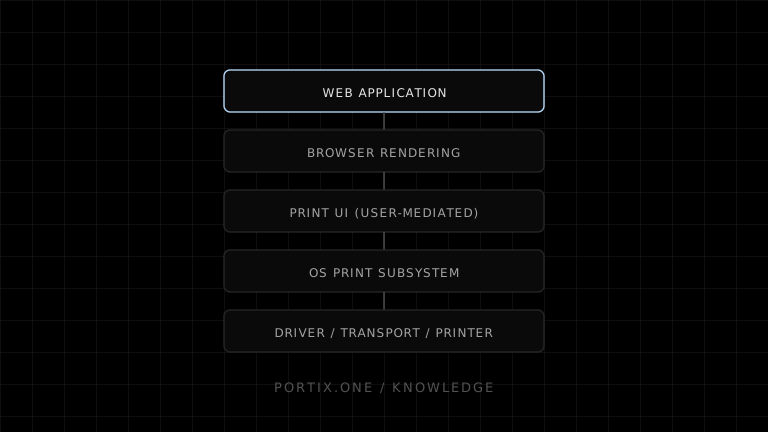
In standard browser printing, the web application defines content and print CSS; the browser converts that content into paged output and mediates user confirmation; the operating system queues and renders the job for a selected destination; and the printer or PDF backend produces the result. The architecture intentionally separates document authorship from device authority. A local printing runtime can add automatic routing, raw commands, or status, but it becomes a privileged component that must be secured and operated.
Browser printing connects a sandboxed web document to platform-managed output without giving the page direct ownership of local printers. Its architecture can be understood as five layers: application, browser rendering, user-mediated print UI, operating-system print services, and the destination device. Optional local runtimes introduce a controlled bridge when a product needs capabilities the standard workflow does not expose.
Standard architecture
┌─────────────────────────────────────────────┐
│ Web application                             │
│ HTML · data · assets · JavaScript · CSS     │
└──────────────────────┬──────────────────────┘
                       │ print request
┌──────────────────────▼──────────────────────┐
│ Browser                                     │
│ policy · print media · layout · pagination  │
└──────────────────────┬──────────────────────┘
                       │ user-confirmed output
┌──────────────────────▼──────────────────────┐
│ Browser / operating-system print UI         │
│ destination · copies · media · orientation  │
└───────────────┬─────────────────┬───────────┘
                │                 │
       ┌────────▼────────┐  ┌─────▼──────────────┐
       │ PDF destination │  │ OS print subsystem │
       └─────────────────┘  │ queue · spooler    │
                            └─────────┬──────────┘
                                      │
                            ┌─────────▼──────────┐
                            │ Driver / renderer  │
                            │ and transport      │
                            └─────────┬──────────┘
                                      │
                            ┌─────────▼──────────┐
                            │ Physical printer   │
                            └────────────────────┘
Implementations can combine or rearrange internal steps. The diagram describes responsibilities rather than prescribing one browser or operating system.
Layer 1: the web application
The application owns the semantic document and its presentation intent:
- HTML content and structure.
- Data selected for output.
- Fonts, images, and other assets.
- Screen and print styles.
- The control that calls
window.print(). - Optional
beforeprintandafterprintbehavior.
The application should produce a complete, accessible document before printing begins. It should not depend on the print workflow to correct missing data or unclear structure.
Layer 2: browser policy and rendering
The browser is both renderer and security boundary. It checks document state and applicable sandbox restrictions, applies print media rules, calculates layout, and fragments content into page boxes.
The browser reconciles several inputs:
DOM + styles + fonts + assets
             ↓
CSS cascade for print media
             ↓
page size and printable constraints
             ↓
layout and fragmentation
             ↓
printable page representation
CSS Paged Media defines a page model and @page features. CSS Fragmentation defines how flows break across pages. Browser implementations decide how supported features become preview and output.
Layer 3: print interaction and destination selection
The browser or operating system presents destination and job settings. This layer protects user agency and adapts the generic document to available destinations.
Its responsibilities can include:
- Enumerating destinations without exposing them directly to page JavaScript.
- Collecting page range, copies, paper, orientation, scale, and color choices.
- Showing a preview.
- Allowing cancellation.
- Routing to a PDF backend or platform print subsystem.
The ownership of individual controls varies by browser and platform. From the application’s perspective, they form a user-mediated boundary.
Layer 4: operating-system print subsystem
The platform accepts the confirmed job and manages it outside the web page. Common responsibilities include:
- Creating and scheduling a print job.
- Holding it in a logical queue.
- Selecting or communicating with a local or network destination.
- Invoking the appropriate rendering or driver path.
- Spooling data when required.
- Reporting platform-visible states and errors.
Microsoft’s documented Windows architecture uses a print spooler and printer drivers. The spooler can store, schedule, transform, and send jobs; the rendering component converts application graphics into a format the printer can use. Other platforms use their own architecture, so product logic should not assume Windows-specific components everywhere.
Layer 5: driver, transport, and device
The driver or modern print path maps generic document output and settings to device capability. Transport carries the job through a local port or network protocol. The printer firmware interprets the result and operates the hardware.
At this layer, success depends on:
- Correct media and printable area.
- Compatible job format.
- Driver or class-driver behavior.
- USB or network availability.
- Device state, firmware, supplies, and mechanics.
The web document has little or no direct visibility into these conditions through window.print().
Optional architecture: trusted local runtime
Operational applications sometimes insert a local service between the web app and platform or device APIs:
Authorized web application
          ↓ authenticated job
Trusted local runtime
  ├─ origin and user authorization
  ├─ printer mapping
  ├─ queue, retry, and status
  └─ rendering or raw command adapter
          ↓
OS queue or direct supported transport
          ↓
Printer
This architecture can support automatic printer selection, silent printing after setup, raw ESC/POS or ZPL, device actions, and richer status. It also introduces installation, lifecycle management, compatibility, observability, and security obligations.
Standard browser vs local runtime
| Architectural concern | Standard browser workflow | Trusted local runtime |
|---|---|---|
| Trust decision | User confirms through browser/platform UI | Pairing and authorization policy |
| Rendering | Browser print engine | Browser, runtime, server, or device-native |
| Printer selection | User-facing UI | Configured mapping can automate it |
| Job visibility | Minimal to page JavaScript | Can expose controlled queue status |
| Raw device protocol | Not exposed by window.print() | Possible through supported adapters |
| Deployment | No extra local component | Install, update, monitor, and revoke |
| Failure recovery | Mostly user-driven | Can implement retry and idempotency |
Data and control planes
Separating two kinds of traffic improves design:
- Data plane: document content, rendered pages, images, or raw printer commands.
- Control plane: identity, printer mappings, capabilities, job state, retry, cancellation, policy, and audit metadata.
Standard browser printing exposes a small control surface to the page. A runtime exposes more, so its APIs should distinguish commands from content and authorize both.
Reliability boundaries
Each layer should report only what it can know:
| Layer | Reliable statement |
|---|---|
| Web application | Required content and assets were prepared |
| Browser | The print workflow was requested or closed |
| Platform queue | A job was accepted and has a platform-visible state |
| Transport/device | Data or device status was observed, when supported |
| Human/operator | The correct physical output was received and usable |
Avoid collapsing these into a single “printed” boolean unless the product defines exactly which boundary that state represents.
Architecture selection guide
Choose the standard browser architecture when the user can review each job, PDF is useful, output volume is low or moderate, and device-specific control is unnecessary.
Add a trusted local or managed component when the business workflow requires unattended routing, known printers, raw protocols, hardware actions, status, retry, or centralized policy. Document the new trust boundary and operational cost before adopting it.
Frequently asked questions
Does the browser communicate directly with the printer?
From a web application’s perspective, standard printing is mediated by the browser and platform. Internal implementations vary, but window.print() does not give the page a direct printer connection.
Where is pagination performed?
The browser’s print layout engine converts the web document into page boxes using its supported CSS paged-media and fragmentation behavior.
What does the spooler do?
A spooler manages platform print jobs, commonly including storage, scheduling, queue selection, transformation, and delivery toward printer hardware.
Can a local runtime bypass the operating-system queue?
Some runtimes can use a supported direct transport or send raw device data; others submit to the platform queue. The correct path depends on device protocol, status needs, drivers, permissions, and deployment constraints.
Is direct printing always more reliable?
No. It can offer tighter control for known devices, but it also owns more protocol, retry, security, compatibility, and support responsibilities.
References
- HTML Standard — Printing — WHATWG, accessed Jul 18, 2026
- CSS Paged Media Module Level 3 — W3C, accessed Jul 18, 2026
- CSS Fragmentation Module Level 3 — W3C, accessed Jul 18, 2026
- Introduction to Printing — Microsoft Learn, accessed Jul 18, 2026
- Print Spooler Architecture — Microsoft Learn, accessed Jul 18, 2026
Related content
concept
Browser Printing Limitations
Understand the limits of window.print(), print CSS, printer selection, silent printing, job status, hardware commands, and cross-browser consistency.
concept
Browser Printing Security
Learn the trust boundaries, threats, privacy risks, and practical controls involved when a website prints through a browser or a local printing integration.
concept
How Browser Printing Works
Follow a browser print job from window.print() and print CSS through preview, the operating-system spooler, printer driver, and physical device.
concept
What Is Browser Printing?
Learn how browser printing turns a web page into paper or PDF, what developers can control with JavaScript and CSS, and where browser-based printing falls short.