
concept · web-technologies
Electron Printing Explained
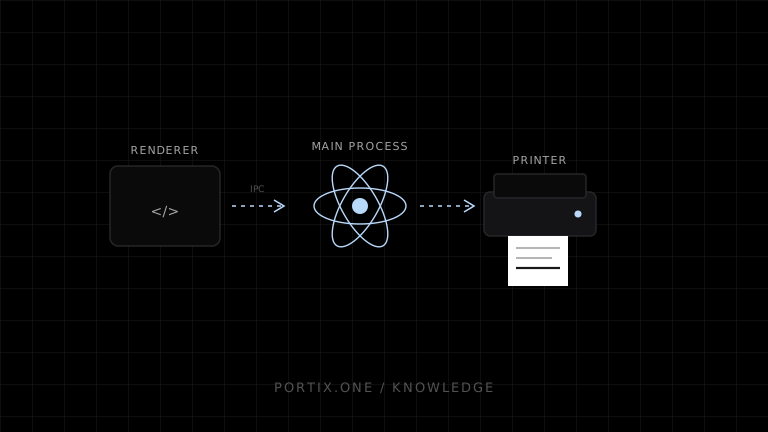
Quick answer
Electron's main process can call webContents.getPrintersAsync() to enumerate system printers and webContents.print() to print rendered content. Options include silent, system deviceName, margins, copies, ranges, duplex, DPI, and page size. printToPDF() returns PDF data. Keep printing authority in the main process, expose a narrow validated IPC API to the renderer, use system-defined printer names, and treat callback success as submission-level feedback—not guaranteed physical completion.
Electron combines Chromium rendering with a desktop application’s access to operating-system APIs. Its webContents printing methods can enumerate system printers, print a rendered page with interactive or silent settings, and generate PDF output. This is more capable than an ordinary browser page but carries native application security and deployment responsibilities.
Architecture
Renderer UI (untrusted or limited)
       ↓ narrow IPC request
Electron main process
  ├─ validates job and authorization
  ├─ resolves system printer
  ├─ manages hidden/visible webContents
  └─ calls print / printToPDF
       ↓
OS queue, driver, and printer
Do not expose arbitrary Electron or Node capability to remote page content.
Printer enumeration
const printers = await win.webContents.getPrintersAsync();
Store logical mappings separately from mutable friendly labels. Electron’s print documentation says deviceName must be the system-defined name, not the friendly name.
Interactive and silent printing
win.webContents.print(
  {
    silent: true,
    deviceName: configuredSystemName,
    printBackground: true,
    copies: 1
  },
  (success, failureReason) => {
    // Record submission result; do not claim physical completion.
  }
);
When silent is true and deviceName is empty, Electron documents that it uses the system default printer with default settings. Production POS should normally map an explicit approved destination rather than depend on a changing default.
Page preparation
- Wait for the document and required assets.
- Use print CSS and an exact printer profile.
- Isolate the printable route from operational UI.
- Test hidden-window rendering and lifecycle.
- Prevent navigation while a job snapshot is prepared.
- Destroy temporary
webContentsafter callbacks and cleanup.
PDF generation
webContents.printToPDF() renders the page and resolves to a Buffer. It is useful for previews, archives, server upload, or a two-stage printing pipeline. Secure the output path and retention; a PDF can contain the same sensitive data as paper.
Security model
- Keep
contextIsolationenabled and avoid unnecessary Node integration. - Expose a narrow preload API with typed methods.
- Validate renderer origin, job schema, page size, copies, and device role.
- Do not accept arbitrary
deviceName, file paths, or raw commands from remote content. - Restrict navigation and new windows.
- Sign applications and updates.
- Apply idempotency, limits, audit metadata, and revocation.
Status and failure
The print callback can report failure reasons such as invalid settings, cancellation, or job failure. It does not create a universal end-to-end device completion signal. For richer status, integrate with platform queues or device protocols and label each state precisely.
Electron vs local runtime
| Electron application | Browser + local runtime |
|---|---|
| UI and native bridge shipped together | Web UI and bridge updated separately |
| Chromium version controlled by app | User’s browser varies |
| Desktop packaging required | Runtime still requires installation |
| Strong integrated IPC option | Web protocol such as WebSocket/HTTP |
Choose based on product distribution, security ownership, browser independence, update cadence, and native scope.
Common mistakes
- Enabling
nodeIntegrationmerely to print. - Sending arbitrary print options from untrusted renderer content.
- Using friendly names as stable printer IDs.
- Printing before fonts/images finish loading.
- Treating callback success as paper delivery.
- Leaving hidden print windows alive.
- Relying on the system default for operational routing.
Frequently asked questions
Can Electron print silently?
Yes. webContents.print() exposes a silent option, subject to platform, printer, and configuration behavior.
Can Electron print raw ESC/POS?
The page-print API renders web content. Raw printing needs a native/Node module, platform queue API, runtime, or device transport designed for raw bytes.
Can it list printers?
Yes, through getPrintersAsync() in the main-process-controlled architecture.
Is Electron printing identical across platforms?
No. Platform print systems, drivers, supported options, and behavior differ. Test each supported OS and device.
References
- webContents API — Printing — Electron, accessed Jul 19, 2026
- Electron Security Checklist — Electron, accessed Jul 19, 2026
Related content
concept
What Is a Local Printing Runtime?
Learn how a local printing runtime securely connects web applications to printers for routing, raw commands, queues, status, retries, and silent printing.
concept
What Are Print Drivers?
Learn how print drivers expose printer capabilities, convert application output into device-ready data, and affect layout, compatibility, performance, and security.
concept
What Is Raw Printing?
Learn how raw printing sends printer-ready bytes such as ESC/POS, ZPL, PCL, or PostScript without normal document rendering.
concept
What Is Silent Printing?
Learn what silent printing means, why normal browsers require confirmation, and how trusted kiosks, local runtimes, native apps, and managed services enable it safely.
concept
window.print(): How Browser Printing Starts
Learn what window.print() does, when it runs, how beforeprint and afterprint work, what CSS can control, and why it cannot silently select a printer.