
concept · web-technologies
Localhost Printing Explained
Quick answer
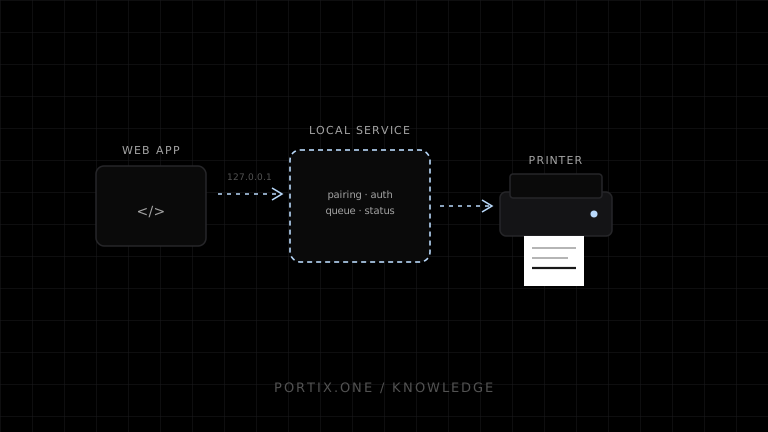
A localhost print bridge listens on a loopback address such as 127.0.0.1 and exposes a narrow authenticated API to an approved web application. The app submits a job, the service validates and routes it, and status returns over HTTP or WebSocket. Loopback limits network reach but is not authentication: the service must verify origins and credentials, resist cross-site requests, constrain printer capabilities, handle browser local-network policy, and update securely.
Localhost printing connects a web application to printing software running on the same computer, commonly through loopback HTTP or WebSocket. The local service can use operating-system queues, drivers, USB devices, network printers, or raw protocols that the page cannot access through window.print().
Architecture
HTTPS web application
        ↓ HTTP(S) or WS(S) to loopback
Local printing service
  ├─ pairing and origin validation
  ├─ job schema and authorization
  ├─ printer-role mapping
  ├─ queue, retry, and status
  └─ driver/raw transport adapters
        ↓
Local USB or reachable network printer
Why localhost
- Works with an existing browser UI.
- Keeps local printer access outside the web sandbox.
- Supports USB, platform queues, raw commands, and device actions.
- Can operate locally during internet interruption.
- Allows independent web and runtime releases with protocol negotiation.
The cost is installation, service lifecycle, port/certificate strategy, version compatibility, and a high-value local security boundary.
HTTP vs WebSocket
| HTTP | WebSocket |
|---|---|
| Simple request/response | Persistent bidirectional session |
| Easy health and job submission endpoints | Live status and low-latency events |
| Polling or callbacks for updates | Reconnect and backpressure required |
| Familiar origin/CORS controls | Must validate WebSocket Origin explicitly |
Either can be secure or insecure. Choose by interaction needs, not trend.
Loopback is not identity
Malicious websites running in the same browser can attempt to reach local services. Other local processes can also connect. Defenses should include:
- Bind only to intended loopback interfaces unless site-gateway use is explicit.
- Pair the runtime with an authenticated application/user/terminal.
- Validate exact allowed origins; no broad wildcard.
- Use short-lived, non-URL credentials and replay protection.
- Require non-simple authenticated requests and validate content type.
- Apply CSRF-style request protections where relevant.
- Authorize printer roles, document types, and hardware actions.
- Bound job size, rate, copies, and command surface.
- Never expose arbitrary filesystem or process execution.
HTTPS, WSS, and browser policy
A secure website should use a transport and certificate strategy compatible with current browser mixed-content and local-network rules. Loopback resources have special secure-context treatment in some specifications and browsers, but behavior evolves. Test every supported browser/version and avoid advising users to disable security checks.
MDN documents emerging local/loopback network permissions and mixed-content interactions. Build a detection and remediation experience rather than assuming permanent behavior.
Discovery and ports
A fixed port is simple but can conflict. Port scanning is noisy and expands attack surface. Alternatives include a narrow fixed range, registered custom protocol for pairing, extension-assisted discovery, or a bootstrap endpoint with authenticated handoff.
Never trust the first process answering on the expected port. Authenticate the runtime and, where applicable, verify its certificate or pairing proof.
Version negotiation
The web application can update while an older runtime remains installed. Begin with a capabilities handshake:
{
  "protocol": "printing-runtime",
  "versions": [2, 1],
  "features": ["queue-status", "escpos", "pdf"]
}
Reject incompatible operations clearly, support an upgrade path, and avoid silently changing print semantics.
Status and recovery
Differentiate:
- Service unreachable.
- Pairing/authentication expired.
- Protocol incompatible.
- Printer role not mapped.
- Queue unavailable.
- Printer offline or paper out.
- Job failed or outcome unknown.
Provide safe retry or reprint using stable job IDs. Do not convert any lost connection into automatic duplicate output.
Common failures
| Symptom | Check |
|---|---|
| Connection refused | Runtime stopped, port, binding, firewall |
| Browser blocks request | HTTPS/WS policy, certificate, local-network permission |
| 401/403 | Pairing, token, origin, tenant, capability |
| Connects but printer missing | Role mapping, driver, USB/network state |
| Duplicates after refresh | Missing idempotency |
| Works on one browser only | Policy or API support difference |
Frequently asked questions
Is localhost always the same computer?
Loopback addresses refer to the local host from the connecting environment, though containers, remote sessions, and virtualization can complicate deployment.
Is localhost automatically secure?
No. It reduces network exposure but does not authenticate the requester or service.
Can localhost printing be silent?
Yes after explicit trusted setup and within the service’s authorized printer policy.
Does it replace the spooler?
Not necessarily. The service can submit to the operating-system spooler or use a supported direct path.
References
- Writing WebSocket Client Applications — MDN, accessed Jul 19, 2026
- Mixed Content — MDN, accessed Jul 19, 2026
- Local Network Access — MDN, accessed Jul 19, 2026
Related content
concept
What Is a Local Printing Runtime?
Learn how a local printing runtime securely connects web applications to printers for routing, raw commands, queues, status, retries, and silent printing.
concept
Native Messaging Explained
Learn how browser extensions communicate with installed native applications through registered hosts, length-prefixed JSON messages, permissions, and allowlists.
concept
What Is Silent Printing?
Learn what silent printing means, why normal browsers require confirmation, and how trusted kiosks, local runtimes, native apps, and managed services enable it safely.
concept
What Is WebSocket Printing?
Learn how a browser uses a persistent WebSocket connection to a trusted local or remote printing service for jobs, status, reconnects, and acknowledgments.