
concept · web-technologies
Native Messaging Explained
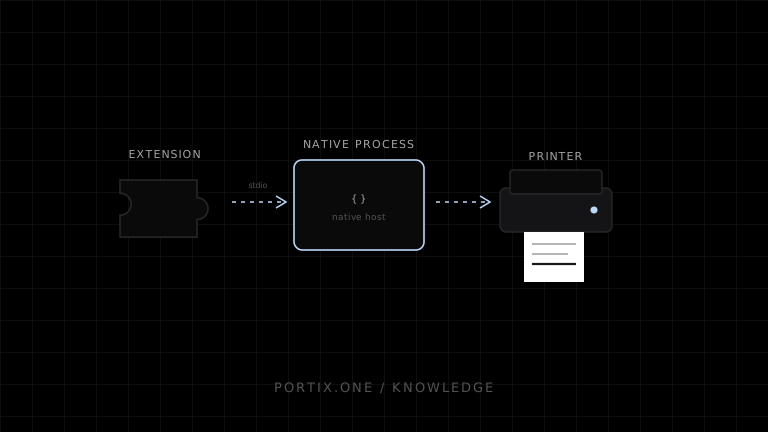
Quick answer
With Native Messaging, an extension declaring the required permission connects to a registered native host. Chrome starts the host as a separate process and exchanges length-prefixed JSON messages over standard input and output. A host manifest identifies the executable and explicitly lists allowed extension origins. Printing can be implemented in the native host, but the architecture requires extension distribution, host installation, platform registration, protocol versioning, authorization, input validation, and secure updates.
Native Messaging is a browser-extension mechanism for exchanging messages with an installed native application. It creates a controlled bridge from an extension context to operating-system capabilities such as files, devices, and printers that ordinary page JavaScript cannot access directly.
Architecture
Web page
   ↓ controlled message
Browser extension content/background context
   ↓ runtime.connectNative / sendNativeMessage
Registered native messaging host
   ↓ OS print APIs, runtime, queue, or device
Printer
Chrome does not allow content scripts to call native messaging directly; they message the extension service worker or extension page, which then calls the native API.
Host registration
The native host manifest defines:
- A stable host name.
- Human-readable description.
- Executable path.
stdiocommunication type.- Exact allowed extension origins without wildcards.
Its installation location and platform registration differ across Windows, macOS, and Linux. The native application installer owns this setup.
Message framing
Messages are serialized as JSON and framed with a 32-bit native-endian length prefix. Standard output must contain only valid protocol frames; diagnostics belong on standard error. Byte length matters and can differ from character count.
Chrome documents a 1 MiB maximum message sent to a native messaging host. Design smaller job contracts or use controlled payload references/chunking where appropriate.
Connection modes
sendNativeMessage()starts a host for a single request/response interaction.connectNative()creates a longer-lived port for multiple messages and pushed responses.
Printing with status updates generally benefits from a persistent connection, but the host must handle extension suspension, browser exit, broken pipes, and reconnection.
Printing design
Use typed messages:
{
  "version": 1,
  "type": "print.submit",
  "jobId": "sale-8472-receipt-v1",
  "printerRole": "customer-receipt",
  "document": { "type": "receipt", "data": {} }
}
Prefer letting the trusted host render or encode an approved schema over accepting unrestricted raw bytes or local paths.
Security
- Allow only the exact signed/managed extension identity.
- Treat web-page-to-extension messages as untrusted.
- Authenticate the user or terminal separately when necessary.
- Validate schemas, sizes, printer roles, and capabilities.
- Apply idempotency and rate limits.
- Never execute arbitrary commands or paths from a message.
- Sign and update both extension and native host securely.
- Revoke deprecated protocol versions and old installations.
Tradeoffs
| Strength | Cost |
|---|---|
| Deep native access | Extension plus native installer |
| Browser-integrated bridge | Browser-specific packaging and policy |
| Explicit extension allowlist | Identity/version coordination |
| Persistent status channel | Process and lifecycle management |
For broad browser support, a localhost runtime with a secure application protocol can be more portable. Native Messaging can be appropriate when enterprise extension deployment is already available.
Common failures
| Error | Check |
|---|---|
| Host not found | Manifest location/registry and host name |
| Access forbidden | allowed_origins and extension ID |
| Communication error | Length prefix, stdout pollution, binary mode |
| Message too large | Encoded byte length and protocol limit |
| Host exits | Crash, stdin close, lifecycle assumptions |
Frequently asked questions
Can a normal website call Native Messaging?
No. It needs an installed extension context and registered native host.
Is the native host sandboxed like a page?
No. It is a native process with operating-system permissions, so input and update security are critical.
Can it enable silent printing?
Yes within a prior authorized extension/host deployment and constrained printer policy.
Is it cross-platform?
The concept is supported by extension platforms, but host installation, paths, registration, and packaging are platform-specific.
References
- Native Messaging — Chrome for Developers, accessed Jul 19, 2026
- chrome.runtime API — Chrome for Developers, accessed Jul 19, 2026
Related content
concept
Electron Printing Explained
Learn how Electron applications enumerate printers, print webContents silently or interactively, create PDFs, isolate renderer privileges, and handle job results.
concept
What Is a Local Printing Runtime?
Learn how a local printing runtime securely connects web applications to printers for routing, raw commands, queues, status, retries, and silent printing.
concept
Localhost Printing Explained
Learn how a web application connects to a local printing service over loopback using HTTP or WebSocket, including pairing, origins, TLS, permissions, status, and recovery.
concept
What Is Silent Printing?
Learn what silent printing means, why normal browsers require confirmation, and how trusted kiosks, local runtimes, native apps, and managed services enable it safely.
concept
What Is WebSocket Printing?
Learn how a browser uses a persistent WebSocket connection to a trusted local or remote printing service for jobs, status, reconnects, and acknowledgments.