
concept · printing-infrastructure
What Are Print Drivers?
Quick answer
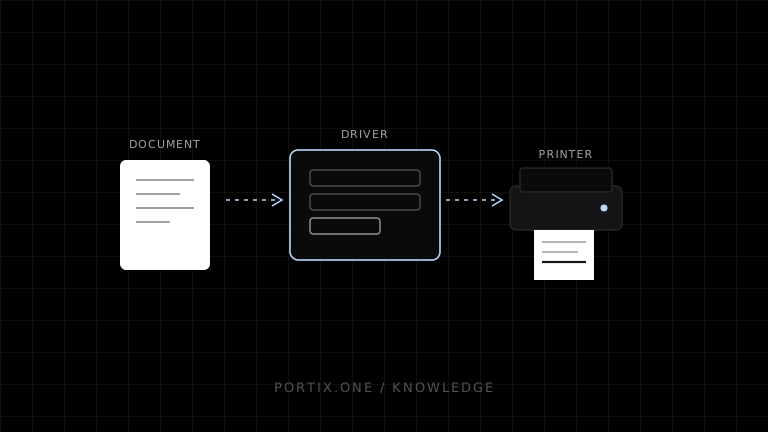
Print drivers translate and configure printing for a device. Microsoft describes driver responsibilities as including a rendering component that converts application graphics into printer-usable data and a configuration component that exposes selectable options and capabilities. Modern class-driver and IPP paths can reduce device-specific packages, while specialized printers may still require vendor software or raw commands. Driver choice affects output, administration, security, and support.
A print driver is software that connects an application’s device-independent print request to the capabilities and data formats of a printer or printer family. It can expose settings such as media, resolution, color, duplex, and finishing, then render or transform document output into a form the printing path can deliver.
Driver position in the pipeline
Application document
        ↓ platform print API
Spooler and intermediate format
        ↓
Driver / class-driver rendering and configuration
        ↓ device-ready data
Port, protocol, or print server
        ↓
Printer
Rendering can occur on a client, server, or device depending on architecture and format.
Driver responsibilities
- Advertise supported paper sizes, resolutions, color modes, duplex, trays, and finishing.
- Translate generic settings into device behavior.
- Render text, vector graphics, and images into a device-supported language or raster.
- Participate in queue and spooler processing.
- Provide configuration UI or extensions where applicable.
- Handle bidirectional capability or status communication in supported architectures.
Not every driver does all of these, and modern platforms increasingly use standardized IPP/class-driver models.
Driver types
| Type | Characteristic | Tradeoff |
|---|---|---|
| Vendor-specific | Tuned to a model or family | More features, package lifecycle and compatibility burden |
| Class/universal | Supports standardized device behavior | Simpler fleet management, possibly fewer specialized features |
| Server-side | Rendering or driver hosted on print server | Central administration, client/server compatibility concerns |
| Driverless/IPP-based | Uses standardized capability and document formats | Requires compatible printer and platform behavior |
| Raw/device-language path | Application creates printer-ready bytes | Application owns compatibility and layout |
“Driverless” usually means no model-specific driver installation, not that no software interprets capabilities or documents.
How drivers affect output
Driver configuration can change margins, scaling, paper mapping, orientation, resolution, rasterization, color, fonts, and finishing. Two queues targeting the same printer can produce different output if their drivers or defaults differ.
For receipt and label printers, record printable dot width, media definition, rotation, cut options, darkness/speed controls, and whether raw passthrough is supported. Never assume a desktop page driver exposes device-native commands.
Raw printing and drivers
Raw printing supplies data already intended for the target printer language. A platform spooler can still queue and transport it, but ordinary driver rendering should not reinterpret it. This improves control for known devices and shifts correctness to the application.
Sending ESC/POS bytes to a printer configured for another language can produce garbage, no output, or unintended actions.
Driver lifecycle
- Obtain packages from trusted platform or manufacturer sources.
- Standardize approved models and versions.
- Test updates against representative documents and devices.
- Roll out gradually with recovery options.
- Remove unsupported packages according to platform guidance.
- Monitor crashes, spooler failures, output regressions, and security advisories.
- Record driver identity in diagnostics without exposing sensitive configuration.
Security considerations
Drivers and related print components process complex, sometimes untrusted document data and interact with privileged platform services. Reduce the number of packages, prefer supported modern paths, restrict installation rights, patch promptly, and isolate or retire legacy dependencies.
Common driver problems
| Symptom | Possible driver factor |
|---|---|
| Wrong paper or margins | Media mapping or queue defaults |
| Gibberish | Wrong language, raw/driver mismatch |
| Spooler crash | Driver or processor defect |
| Very large job | Full-page rasterization or resolution |
| Missing cutter option | Generic driver or unsupported model feature |
| Different output by workstation | Driver version or defaults differ |
Frequently asked questions
Does every printer need a vendor driver?
No. Compatible printers can use platform class drivers or standardized IPP paths. Specialized features may still require vendor support.
Is ESC/POS a driver?
No. It is a command system. A driver, application, SDK, or runtime can generate ESC/POS data.
Can a driver make browser printing silent?
Installing a driver does not remove the standard browser’s user-mediated print workflow. Silent behavior needs controlled browser policy or another trusted integration.
Why use a universal driver?
It can simplify fleet management, but confirm that required media, finishing, status, and device-specific features remain available.
References
- Introduction to Printing — Microsoft Learn, accessed Jul 19, 2026
- Printer Driver Architecture — Microsoft Learn, accessed Jul 19, 2026
Related content
concept
Network Printing Explained
Learn how clients, print servers, queues, DNS, IPP, raw TCP, drivers, security, status, and failover work in network printing.
concept
What Is a Print Queue?
Learn how print queues organize jobs, destinations, states, priorities, retries, and operator actions—and how a queue differs from a spooler.
concept
What Is a Print Spooler?
Learn how a print spooler accepts, stores, schedules, processes, and sends print jobs—and how to diagnose spooler failures safely.
concept
What Is Raw Printing?
Learn how raw printing sends printer-ready bytes such as ESC/POS, ZPL, PCL, or PostScript without normal document rendering.
concept
USB Printing Explained
Learn how USB printers connect through device classes, endpoints, operating-system queues, drivers, raw protocols, permissions, and stable device mapping.