
concept · thermal-printing
Receipt Printers Explained
Quick answer
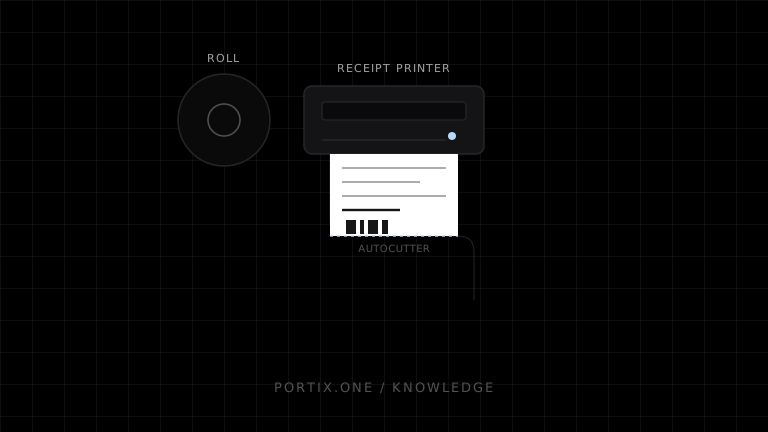
Most modern checkout receipt printers use direct thermal line printing: a fixed-width printhead heats coated roll paper as it advances, then an autocutter separates the receipt. Impact models strike an inked ribbon and remain useful for multipart paper or certain hot, greasy environments. Select a receipt printer by paper width, print method, workload, connectivity, software compatibility, cutter and drawer requirements, maintainability, and total supply cost—not headline speed alone.
A receipt printer is a purpose-built device for narrow, transaction-oriented documents. It prioritizes fast first output, simple roll media, compact placement, and continuous operation at a checkout or service point. The printer is only one part of the system: application layout, command language, connection, operating-system queue, and physical paper all influence the result.
How a thermal receipt printer works
POS creates receipt content
          ↓
Driver, SDK, browser, or command encoder formats job
          ↓
Printer receives raster data or device commands
          ↓
Thermal line head forms rows of dots on moving paper
          ↓
Paper feeds and optional cutter activates
          ↓
Customer or operator receives receipt
Typical devices print across a fixed dot width. For example, official Epson documentation for particular 58 mm and 80 mm models specifies different printable widths and characters per line. Those values are model-specific, so layouts must use the actual target device profile.
Thermal vs impact receipt printers
| Criterion | Direct thermal | Impact |
|---|---|---|
| Marking method | Heat-sensitive paper | Pins strike ribbon against paper |
| Noise | Low | Higher |
| Speed | Commonly fast for receipts | Commonly slower |
| Supplies | Thermal roll | Plain paper plus ribbon |
| Multipart forms | No | Possible on compatible models/media |
| Heat-sensitive environment | Requires qualified media | Can be more suitable |
| Graphics and QR codes | Generally strong on supported models | More constrained |
Choose based on environment and document requirements rather than assuming thermal is mandatory.
Paper width and printable width
Nominal roll width is not the same as printable width. A printer needs margins, and some models use guides or configuration to support narrower rolls. Common POS categories include approximately 58 mm and 80 mm rolls, but tolerances, printable dots, diameter, core, coating side, and approved media vary.
Before designing a receipt, record:
- Nominal paper width and actual printable dot width.
- Resolution and supported fonts.
- Maximum roll diameter and core requirements.
- Cutter or tear-bar behavior.
- Media storage and environmental limits.
Connectivity
Receipt printers can expose USB, Ethernet, Wi-Fi, Bluetooth, serial, or vendor-specific combinations. Connectivity answers only how bytes travel. It does not by itself guarantee browser support, discovery, silent printing, status, or command compatibility.
| Connection | Best fit | Main concern |
|---|---|---|
| USB | Fixed workstation | Local drivers, port mapping, cable reach |
| Ethernet | Shared or remotely placed printer | Addressing, network segmentation, availability |
| Wi-Fi | Flexible placement | Signal, credentials, roaming, power-saving behavior |
| Bluetooth | Mobile or compact setups | Pairing, range, platform support |
| Serial | Legacy and controlled installations | Port settings and adapters |
Receipt data paths
Browser-rendered printing
The application creates HTML/CSS and opens the browser print workflow. This is easy for user-confirmed jobs but offers limited printer selection and no standard raw cutter or drawer commands.
Operating-system driver
The application submits a document through an installed queue. The driver renders it for the printer. This integrates with platform administration but can introduce margin, scaling, and driver differences.
Device-native commands
The application or trusted runtime creates commands supported by the printer, often including text, images, barcodes, feed, cut, and peripheral actions. ESC/POS is common, but command support and extensions vary by model.
Vendor SDK or service
A vendor or platform abstraction can handle discovery, rendering, and status. Evaluate its supported devices, deployment model, updates, offline behavior, and lock-in.
Cutters and cash drawers
An autocutter is a physical component activated by a supported command or driver action. A cash drawer often connects to a printer’s drawer-kick port and is triggered by a timed electrical pulse. Neither feature is automatically available from window.print().
Treat drawer opening as an authorized operational action. Do not couple it to any print attempt without defining when the sale is valid, who may trigger it, and how duplicates are prevented.
Receipt design principles
- Put merchant identity and transaction outcome first.
- Use the target dot width, not a generic desktop page width.
- Align monetary columns predictably and preserve decimal precision.
- Use raster graphics sparingly; large images increase transfer and print time.
- Give barcodes and QR codes sufficient size, contrast, and quiet zones.
- Avoid gray, tiny type, and low-density rules on unknown media.
- Keep legal, return, tax, and accessibility requirements specific to the jurisdiction and business.
- Test long product names, discounts, refunds, multiple currencies, localization, and paper-near-end conditions.
Common failures
| Symptom | Check first |
|---|---|
| Garbled characters | Encoding, code page, command mode |
| Blank output | Media orientation, thermal coating, data path |
| Clipped columns | Printable width and layout profile |
| Slow receipt | Images, transfer bandwidth, driver rasterization |
| Cutter does not run | Model support, command, configuration, jam |
| Drawer does not open | Port, pulse command, cable, authorization logic |
| QR code will not scan | Size, quiet zone, error correction, heat, media |
Frequently asked questions
Do receipt printers need ink?
Direct thermal models do not. Impact models use an inked ribbon.
Is every 80 mm receipt layout interchangeable?
No. Nominal width, printable dots, margins, fonts, resolution, commands, and cutter behavior can differ.
Can a browser print directly to a receipt printer?
It can use the normal print workflow if a compatible destination is installed. Silent routing or device commands generally require a controlled integration.
What is ESC/POS?
It is a command system associated with POS printers. Real device support must be checked against the model’s programming reference.
References
- TM-m10 and TM-m30 POS Receipt Printer Specifications — Epson, accessed Jul 18, 2026
- TM-H6000IV Technical Reference Guide — Epson, accessed Jul 18, 2026
- What Is a Thermal Printer? — Zebra Technologies, accessed Jul 18, 2026
Related content
concept
Direct Thermal vs. Thermal Transfer Printing
Compare direct thermal and thermal transfer printing by durability, consumables, media, maintenance, cost, and use case.
concept
POS Printing Basics
Learn the essential components of point-of-sale printing, from receipt data and rendering to printer routing, ESC/POS commands, queues, cutters, drawers, and recovery.
concept
What Is a Thermal Printer?
Learn how thermal printers use heat to produce receipts, labels, and barcodes, including direct thermal and thermal transfer technologies.