
concept · web-technologies
WebHID Explained
Quick answer
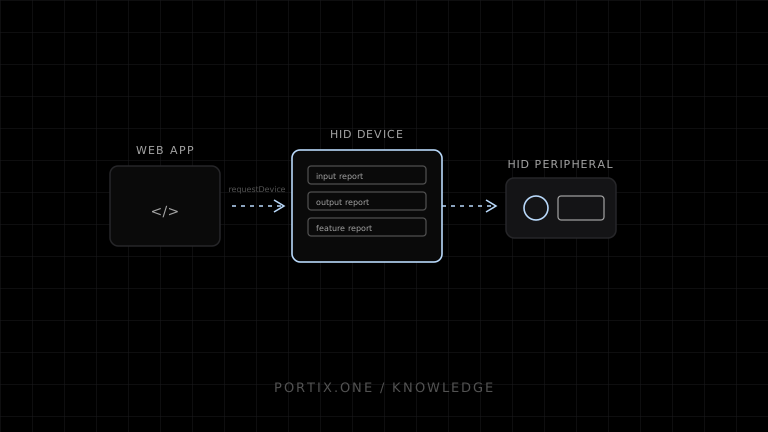
WebHID lets a supported secure website ask the user to select a HID device, open it, receive input reports, and send output or feature reports defined by the device's HID report descriptor. The application must understand usage pages, report IDs, and binary layouts. A printer is accessible through WebHID only if it deliberately exposes a compatible HID interface; ordinary USB printer-class devices should use their normal print path or another appropriate API.
WebHID is a browser API for communicating with Human Interface Devices that expose HID reports beyond the web platform’s usual keyboard, pointer, and gamepad abstractions. It is useful for specialized scanners, control panels, scales, and vendor devices. It is not a general-purpose printer API.
HID model
HID report descriptor
  ├─ collections
  ├─ usage pages and usages
  ├─ input reports
  ├─ output reports
  └─ feature reports
The descriptor defines data structure. WebHID exposes that structure and report events; it does not infer application meaning.
Permission flow
const devices = await navigator.hid.requestDevice({
  filters: [{ vendorId: 0x1234, productId: 0x5678 }]
});

const device = devices[0];
await device.open();
Values are placeholders. Filter as narrowly as possible and explain the requested device to the user.
Previously authorized devices may be returned by navigator.hid.getDevices() in supported implementations. Connection and permission do not guarantee that the device remains attached or available.
Reports
Input reports arrive asynchronously. Output and feature reports send binary fields according to the descriptor and vendor protocol. Validate report IDs, lengths, ranges, endianness, and checksums.
device.addEventListener("inputreport", event => {
  const { reportId, data } = event;
  // Parse only with the verified device protocol.
});
WebHID and POS hardware
Appropriate uses can include a specialized barcode scanner, keypad, scale, or customer-facing control that uses HID reports. Some devices support multiple modes, such as keyboard emulation and vendor HID mode.
For printing, use WebHID only when the manufacturer documents print or control data over a HID interface. Do not choose it merely because the printer connects through USB.
Security and privacy
- Require a secure context and explicit user selection.
- Restrict vendor, product, usage page, and usage filters.
- Expose only required device functions.
- Validate all incoming reports as untrusted binary data.
- Bound output commands and frequency.
- Avoid collecting unrelated device inputs.
- Handle disconnect and permission revocation.
- Maintain a browser/platform support fallback.
Common failures
| Symptom | Check |
|---|---|
| Device absent from chooser | Protected device class, filters, OS ownership, support |
| Opens but no events | Wrong report/usage, device mode, listener lifecycle |
| Output ignored | Wrong report ID, length, protocol, or permissions |
| Data fields look wrong | Bit layout, signedness, endianness |
| Works only on one browser | WebHID support limitation |
When to use WebHID
Use it for a known HID fleet when the manufacturer documents reports and browser support fits the deployment. Prefer standard keyboard/gamepad APIs for ordinary devices, WebUSB for appropriate USB interfaces, Web Serial for serial devices, and a local runtime for broad hardware integration.
Frequently asked questions
Is every USB device a HID device?
No. HID is one USB/device class model. Printers commonly expose printer-class or vendor interfaces instead.
Can WebHID read a barcode scanner?
It can access supported non-protected HID interfaces after permission. Keyboard-emulating scanners may be handled as normal keyboard input instead.
Does WebHID work in every browser?
No. Maintain an up-to-date compatibility matrix.
Can it bypass user permission?
No. Device selection and remembered grants are controlled by the browser.
References
- WebHID API — MDN, accessed Jul 19, 2026
- Connect to Uncommon HID Devices — Chrome for Developers, accessed Jul 19, 2026
Related content
concept
ESC/POS Barcodes
Learn how ESC/POS printers generate one-dimensional barcodes, including symbology, data validation, module width, height, HRI text, quiet zones, and verification.
concept
What Is a Local Printing Runtime?
Learn how a local printing runtime securely connects web applications to printers for routing, raw commands, queues, status, retries, and silent printing.
concept
USB Printing Explained
Learn how USB printers connect through device classes, endpoints, operating-system queues, drivers, raw protocols, permissions, and stable device mapping.
concept
WebSerial Explained
Learn how Web Serial lets authorized websites read and write serial ports, configure line settings, stream bytes, and communicate with compatible printers.
concept
WebUSB Explained
Learn how WebUSB lets an authorized website communicate with compatible USB devices, including selection, interfaces, endpoints, permissions, security, and printing constraints.