
guide · applications
How to Build a Ticketing System
Quick answer
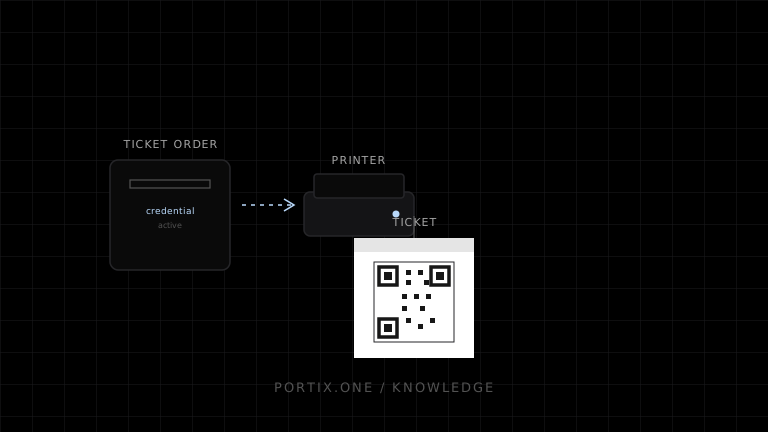
Issue each ticket from a durable order using an opaque, unpredictable credential. Render a human-readable identifier and machine-readable QR code or barcode, then print through an idempotent job. At entry, validate the credential against its event, time, status, and usage policy. Make reprints auditable without silently creating new admission rights.
The printed ticket is a presentation of an admission credential; it should not be the only record that the credential exists or was used.
Separate the records
Model the order, ticket, credential, print artifact, print job, and scan event independently. This permits payment recovery, delivery by multiple channels, print retries, cancellation, transfer, and entry auditing without corrupting the underlying entitlement.
type AdmissionTicket = {
  id: string;
  eventId: string;
  credentialDigest: string;
  status: "active" | "used" | "void" | "refunded";
  validFrom: string;
  validUntil: string;
};
Store a protected representation of the credential where possible. Sequential order numbers alone are easy to guess and should not grant admission.
Issuance and printing
Finalize the commercial order before issuing credentials. Generate one immutable artifact per ticket version and use a job key such as ticketId:artifactVersion:printerId. A retry reuses that job; a replacement credential is an explicit security event that invalidates the old credential.
Print enough quiet zone and contrast around the code, avoid scaling after rasterization, and test with the exact scanners and worn media expected in operation. Keep readable event, date, section, seat, and support information outside the code.
Gate validation
Online validation should atomically change an eligible credential to used. For offline gates, distribute signed or otherwise verifiable limited-scope data, prevent easy replay within a device, and reconcile scans quickly. Define the conflict policy when two offline gates accept the same credential.
Privacy and abuse controls
Do not encode unnecessary personal data in a visible QR code. Rate-limit lookups, authorize reprints and voids, log operators, and avoid exposing internal database IDs when a random public identifier is sufficient.
Portix integration boundary
Portix printer selection, QR/barcode payload support, job submission, and status semantics remain undocumented for now. Ticket validity must remain in the application service, not in the printer runtime.
Launch checklist
- Credentials are unpredictable and scoped to an event.
- Issuance and printing are idempotent.
- Replaced credentials invalidate old ones.
- Codes scan from real printed stock.
- Offline duplicate-entry policy is documented.
- Refund, transfer, void, and reprint events are audited.
Related content
concept
ESC/POS Barcodes
Learn how ESC/POS printers generate one-dimensional barcodes, including symbology, data validation, module width, height, HRI text, quiet zones, and verification.
concept
ESC/POS QR Codes
Learn how ESC/POS printers configure, store, and print QR Codes, and how to choose module size, error correction, payload, quiet zones, and verification.